How Nightward works
Nightward is a runtime security monitor for WordPress. It records what installed plugins and themes do, names the file and line responsible, and reports by e-mail. This page explains every monitor, what each finding means, and what to do about it.
Installation
Requirements
- WordPress 6.2 or newer, PHP 7.4 or newer. MySQL, MariaDB and the SQLite database integration are supported.
- A working
wp_mail(). On most hosts this means an SMTP plugin. - WP-Cron that runs at least every hour. A real server cron job is recommended, see Scheduled jobs.
- A writable
wp-content/mu-pluginsfolder is recommended so Nightward can start before other plugins.
Install
- Download
nightward-1.0.2.zip. - In WordPress go to Plugins → Add New → Upload Plugin, choose the zip and click Install Now.
- Click Activate. A Nightward item appears in the admin menu.
- Open Nightward → Settings, check the report time and recipients, then click Send test report.
What happens on activation
- Three database tables are created: events, outbound hosts and file hashes.
- The early loader
wp-content/mu-plugins/0-nightward-early.phpis written. Must-use plugins load before regular plugins, so Nightward sees their hooks and requests from the first line. The file is removed when Nightward is deactivated. - The daily report, the hourly check and the nightly maintenance are scheduled.
- The first file integrity scan starts one minute later. It records the current state of every package.
- The learning period starts. See The first day.
Updating
Nightward is distributed from this website, not from WordPress.org. To update, deactivate the plugin, replace the nightward folder with the new version and activate it again. Events, baselines and settings are kept. Replacing Nightward's own files changes its own snapshot, so after an update run Integrity → Scan now and accept the Nightward package if it is listed.
The source code and full history are on GitHub. Bug reports are welcome there as issues.
The first day
A monitor that reports every plugin's normal behaviour as news is useless. For the first 24 hours (the learning period, adjustable in Settings) Nightward records what is normal for this site without reporting it:
- which hosts each plugin contacts;
- which third-party callbacks are attached to sensitive hooks;
- which scheduled tasks exist;
- which files each package contains.
Critical findings are reported from the first minute: code compiled with eval() on a hook, an administrator created by an anonymous request, a request to a paste site. The overview screen shows how much of the learning period is left.
Relearning after updates
When a plugin or theme is installed, activated or updated through WordPress, it gets a six-hour window in which new hooks are recorded as the new baseline. They still appear in the event log (as Low for login and visibility hooks, Info for the rest), so a new plugin that hooks into login is visible in the next report.
Events and severity
Every monitor writes to one event log. An event has a severity, an area, a title, an explanation, and where possible the plugin or theme, the file and the line responsible.
Severity levels
| Level | Meaning | Instant e-mail |
|---|---|---|
| Critical | Signs of compromise or a change that gives someone control: a hidden administrator, code from eval() on a login hook, a hijacked update, a payload in uploads. | Yes |
| High | Likely a problem, but there are legitimate explanations: a licence check answered locally, a file changed without a version change, a public debug log. | Optional |
| Medium | Worth checking: plain-HTTP update packages, PHP execution allowed in uploads, a site without HTTPS. | No |
| Low | Changes to know about: a plugin contacting a new host, a login from a new network, an update installed outside WordPress. | No |
| Info | Records for context: an administrator created from the Users screen, a new baseline after an update. | No |
Statuses
| Status | What it means |
|---|---|
| Open | New or seen again after being resolved. Counted on the overview and in the menu badge (critical and high only). |
| Acknowledged | You have seen it and are working on it. Still listed, not counted as new. |
| Resolved | Fixed. If the same thing happens again, the event reopens and can alert again. |
| Ignored | Expected on this site. The same event will not be reported again. |
Duplicates
The same finding is stored once with a counter. A plugin that makes the same request 500 times is one event with × 500, and it alerts once. For file findings the file hash is part of the identity: if an ignored file changes again, a new event is created.
Attribution
Findings name the component responsible: a plugin or theme by its name, a must-use plugin, a drop-in such as db.php, WordPress core, or code executed via eval() when the code has no file. For runtime events Nightward walks the call stack to the first frame that belongs to a plugin or theme. For hook callbacks it uses PHP reflection to find the file and line where the function is defined.
Events are stored language-independently and shown in the language of whoever reads them, in the dashboard and in e-mail.
Outbound requests
Every call made through the WordPress HTTP API (wp_remote_get(), wp_remote_post() and everything built on them) is recorded with its host, the plugin that made it, and the file and line of the call. Query-string values are removed before anything is stored, so licence keys and tokens in URLs are not kept.
Findings
| Finding | Severity |
|---|---|
| Request to a paste or anonymous file-sharing site (pastebin.com, paste.ee, transfer.sh, file.io…) | Critical |
| Request to a tunnel (ngrok, Cloudflare quick tunnels, localtunnel…), request-capture service (webhook.site, requestbin, pipedream), dynamic DNS domain, .onion address | Critical |
| Request to polyfill.io and related domains from the 2024 supply-chain attack | Critical |
| Request to a known distributor of pirated plugins | Critical |
| Request to a bare public IP address instead of a domain | High |
| Request to the Telegram Bot API or a Discord webhook | Medium |
| A plugin contacts a host for the first time (after the learning period) | Low or Info for well-known services |
A plugin's own domains are not reported as new hosts. Nightward reads them from the Plugin URI, Author URI and Update URI headers, ignoring platforms such as GitHub, WordPress.org and CodeCanyon.
Trusted hosts
If a finding is expected, for example your own plugin that forwards mail to a Telegram bot, click Trust on the event or on the Network screen, or add the domain under Settings → Trusted hosts. Requests and update downloads to trusted hosts are not reported.
HTTP interception
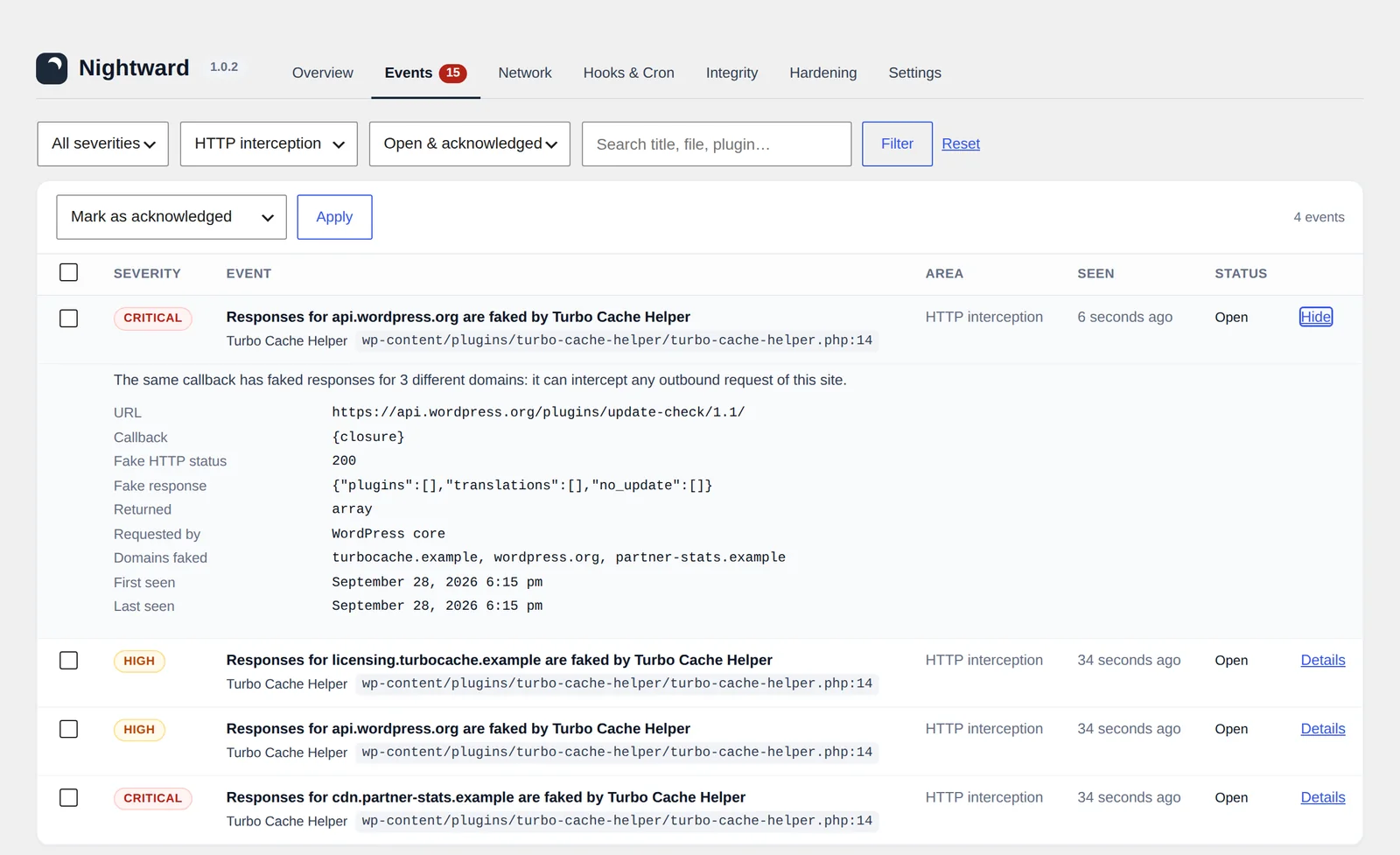
WordPress lets any plugin answer an HTTP request itself through the pre_http_request filter. The request then never leaves the server. Caching plugins and "disable external requests" tools use this legitimately. Pirated plugins use it to answer their own licence checks, and malware uses it to hide or fake update information.
Nightward inserts a marker after every callback on pre_http_request. When a response appears, it knows exactly which callback produced it, even when several anonymous functions share the same priority. The event shows the callback, its file and line, the fake status code and the beginning of the fake body.
| Finding | Severity |
|---|---|
Request blocked with a WP_Error | Low |
| Response replaced for an ordinary request | Medium |
Licence, activation, verification or update check answered with 200 | High |
| WordPress.org API answered locally | High |
| The same callback faked responses for three or more domains | Critical |
The intercepting callback was created with eval() | Critical |
Sensitive hooks
Some WordPress hooks decide who is logged in, what a user may do, what the administrator sees and where updates and mail go. Nightward remembers every third-party callback on these hooks and reports new ones.
| Group | Hooks |
|---|---|
| Authentication and permissions | authenticate, wp_authenticate_user, determine_current_user, check_password, user_has_cap, map_meta_cap, rest_authentication_errors, application_password_is_api_request, auth_cookie_valid, wp_login |
| What the administrator can see | all_plugins, pre_user_query, users_list_table_query_args, views_users, show_advanced_plugins, site_transient_update_plugins, site_transient_update_core |
| Updates, HTTP and mail | upgrader_pre_download, upgrader_package_options, pre_set_site_transient_update_plugins, pre_set_site_transient_update_themes, http_request_args, pre_wp_mail, phpmailer_init, xmlrpc_methods |
| Finding | Severity |
|---|---|
A callback on any hook was compiled from a string with eval() or create_function() | Critical |
| New callback on an authentication or visibility hook from a plugin that was not recently installed or updated | High |
| New callback from a must-use plugin, drop-in or unknown location | High |
| New callback on an update, HTTP or mail hook | Medium |
| New callback right after the plugin was installed or updated | Low / Info |
Callbacks created with eval() have no source file, so file scanners cannot find them. Nightward reports the file and line where eval() was called. The Hooks & Cron screen lists every current third-party callback on these hooks. A plugin being listed is not a problem by itself: security, membership and SMTP plugins must hook in. You should recognise every line.
Users and privileges
Creating a hidden administrator is the most common way to keep access to a hacked site. Nightward watches every path to administrator rights.
| Finding | Severity |
|---|---|
Administrator created or promoted during an anonymous request, by a user who may not grant roles, or by code from eval() | Critical |
| Administrator appeared in the database without any WordPress user function being called (direct SQL), found by the hourly audit | Critical |
| Hidden administrator: present in the database, missing from the filtered Users list | Critical |
| Administrator created by a plugin while an administrator was working in the dashboard (for example a role editor) | High |
| Application password created for an administrator | Medium, High if not created from the profile screen |
| Administrator password or e-mail changed by plugin code | Medium, Critical if the current user may not edit users |
| Administrator created from WP-CLI | Medium |
| Administrator logged in from a network (/24 for IPv4, /48 for IPv6) not seen for this account before | Low |
| Administrator created from the Users screen or REST API by an administrator | Info |
Application passwords give permanent REST and XML-RPC access. They bypass two-factor login and survive a password change, which makes them a quiet way to keep access. If you did not create one, remove it in the user's profile.
Options
A handful of settings hand control of the site to whoever changes them. Nightward records who changed them and whether it happened through the Settings screens.
| Finding | Severity |
|---|---|
default_role set to administrator, editor or shop manager | Critical |
| Registration opened while the default role is privileged | Critical |
Site address (siteurl, home) changed outside the Settings screen | Critical |
| Subscriber, customer, contributor, author or the default role gained administrator capabilities | Critical |
| Admin e-mail changed outside the Settings screen | High |
| Plugin activated by code, not from the Plugins screen or WP-CLI | High |
| Active theme switched by code | High |
| A plugin writes the same option on 60% or more of page views | Low |
| Autoloaded options exceed 800 KB (3 MB for medium) | Low / Medium |
Option writes are sampled on about one front-end page view in twenty and evaluated hourly after at least 15 samples. A plugin that writes to the database on nearly every visit wastes resources and breaks full-page caching. In licence code it can also mean the site reports home on every request.
Scheduled tasks
Malware often returns after cleanup because a scheduled task downloads it again. The hourly check compares WP-Cron with the known list.
| Finding | Severity |
|---|---|
| Task arguments contain PHP code, a long base64 blob or a URL to a file | Critical |
| Task name looks random (hex strings, long names without vowels or separators) | High |
| New task with no handler attached in this request | Low |
| New task (after the learning period) | Info |
The Hooks & Cron screen lists every task with its schedule, next run and the plugin whose function runs it. Tasks without a handler are usually left behind by removed plugins.
File integrity
Every code file (PHP, JavaScript, .htaccess, .user.ini, JSON, Twig) in core, plugins and themes is checked against a reference.
| Package | Reference |
|---|---|
| WordPress core | Official checksums from api.wordpress.org for your exact version and locale. |
| Plugins from WordPress.org | Official per-version checksums from downloads.wordpress.org. |
| Premium plugins and all themes | Nightward's own snapshot, taken at the first scan of each version ("own snapshot"). |
| Finding | Severity |
|---|---|
Modified or unexpected PHP file that contains malware markers: eval(base64_decode(, request data passed to eval/system, preg_replace /e, remote includes, long base64 blobs, chr() chains, PHP inside an image header | Critical |
| Core file differs from the release, or unknown file among core files | High |
| WordPress.org plugin file differs from the official copy of this version, or unknown PHP file in it | High |
| Premium plugin or theme file changed, or new PHP file added, while the version number stayed the same | High |
| Package version changed outside the WordPress updater (FTP, SSH, deployment) | Low |
| Files removed without a version change | Low |
How scans run
The scan runs every night (03:30 by default) and after every update, in batches of 400 files through WP-Cron, so it finishes on shared hosting. Integrity → Scan now runs it from the browser with a progress bar. When a restored file matches its reference again, its event is resolved automatically.
Accepting your own changes
If you edited a premium plugin or theme yourself, review the finding and click Accept current files for that package. Its current files become the new reference and its open integrity events are resolved.
Executable files
Checked hourly (quick pass) and nightly (full pass).
| Location | What is reported | Severity |
|---|---|---|
uploads | PHP and other executable scripts; .user.ini / php.ini; .htaccess that enables script handlers or PHP settings; media files that contain PHP code | High, Critical with malware markers |
uploads | Double extensions such as photo.php.jpg | Medium |
wp-content root | PHP files that are not WordPress drop-ins or known cache configurations | High |
mu-plugins | New must-use plugins (after the learning period) | High |
cache, languages | Runnable PHP (translation .l10n.php files and cache data files are skipped) | High |
upgrade | PHP left behind by interrupted updates | Medium |
Data files whose first statement is exit or die cannot run anything and are not reported. Sucuri, Wordfence and several cache plugins store data this way. "Silence is golden" index.php stubs are skipped too. When a reported file is deleted, its event is resolved on the next pass.
Update channel
Nightward checks where updates come from, both the updates waiting on Dashboard → Updates (hourly) and every package the updater actually downloads.
| Finding | Severity | Download |
|---|---|---|
| A WordPress.org plugin or core update served by another server | Critical | Always blocked |
| Package from a known malicious host (paste sites, tunnels, pirate distributors) | Critical | Always blocked |
| Package from a host unrelated to the vendor, or from a bare IP address | Medium | Blocked if the setting is on |
| Package downloaded over plain HTTP | Medium | Allowed |
Update list entry without the required plugin field | Medium | n/a |
A package host is accepted when it matches the plugin's own domains, a trusted host, or a common distribution platform (GitHub, Amazon S3 and CloudFront, Freemius, Envato, WooCommerce and similar). Findings for pending updates list the plugins and themes that can rewrite the update list, so you know where to look.
plugin field. WordPress.org never produces such entries. Since version 1.0.2 Nightward reports it and lists the code that alters the update list. The usual source is the built-in updater of a plugin from an unofficial source.Hardening
Checked nightly and on demand from Hardening → Run checks. Where it matters, the check requests the file from outside through a loopback request, the way an attacker would. Only failed checks create events. The score starts at 100 and loses points for each failed or warning check by its severity.
| Check | What fails it |
|---|---|
| Exposed files | debug.log (or your custom WP_DEBUG_LOG), .env, .git/HEAD, wp-config.php backups (.bak, .old, .save, .orig, ~, .txt, .swp), SQL dumps and archives in the site root, when they can be downloaded |
| PHP execution in uploads | Nightward writes a harmless test file to uploads, requests it and deletes it. If it runs, any upload vulnerability becomes code execution. |
| Directory listing | The uploads folder shows an "Index of" page. |
| XML-RPC | xmlrpc.php answers login methods (allows many password guesses per request). |
| User enumeration | The REST API lists user login slugs to visitors. |
| "admin" login | An administrator is called admin. |
| HTTPS | The site address is not HTTPS. |
| Security headers | Missing X-Content-Type-Options, X-Frame-Options or CSP frame-ancestors, Referrer-Policy, and HSTS on HTTPS sites. |
| wp-config.php permissions | Writable by everyone, or readable by other users of the server. |
| File editor | DISALLOW_FILE_EDIT is not set. |
| Error display | PHP errors are shown to visitors. |
| PHP and WordPress versions | PHP older than 8.1, or a WordPress update is available. |
| Inactive plugins | Deactivated plugins are still on disk, where their files can be requested directly. |
| WP-Cron | Nightward's hourly job has not run for more than three hours. |
# wp-config.php
define( 'DISALLOW_FILE_EDIT', true );
define( 'WP_DEBUG_DISPLAY', false );

# nginx: deny PHP in uploads
location ~* /wp-content/uploads/.*\.php$ { deny all; }

# Apache (.htaccess in wp-content/uploads)
<FilesMatch "\.php$">
	Require all denied
</FilesMatch>
Reports and alerts
Daily report
Sent every day at the configured time in the site timezone (20:00 by default). The schedule is recalculated after each report, so it stays on time across daylight saving changes. It contains:
- the overall status and counters by severity for the period since the last report;
- critical and high findings with source, file and explanation, then the other findings in short form;
- new outbound destinations and the plugins that contacted them;
- the state of the checks: last integrity scan, hosts contacted and responses faked, hardening score, WP-Cron health.
With Send the report even when nothing happened on (the default), a quiet day still produces a short "All clear" message. If the message stops arriving, the site, WP-Cron, mail delivery or Nightward itself has stopped working.
Instant alerts
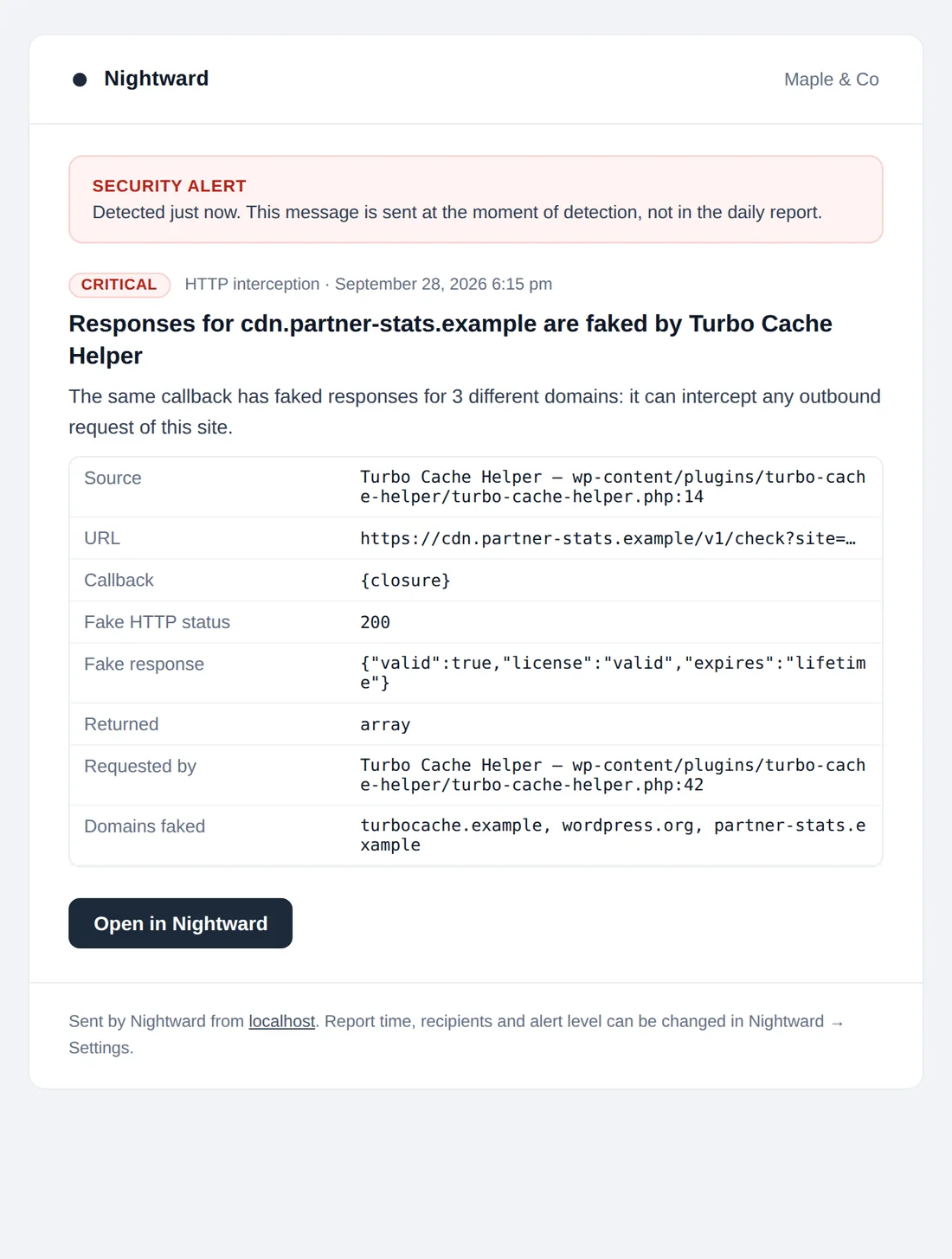
Critical findings (optionally high as well) are e-mailed the moment they are detected, with full details and a link to the event. At most 5 alerts are sent per hour by default. Anything above the limit is combined into one message sent when the hour ends.
Language
If the first recipient is a user of the site, the report is written in that user's WordPress language. Otherwise the site language is used. English and Ukrainian are included.
Testing and delivery
Send test report sends the current report immediately, marked as a test. Preview opens it in the browser. Messages are sent with wp_mail() as HTML with a plain-text part, so they also read well when a Telegram or Slack bridge converts them to text. If the test fails, the dashboard shows the mailer's error; configure an SMTP plugin.
Dashboard
| Screen | What it is for |
|---|---|
| Overview | Site status, open findings by severity, critical and high items, report schedule and mail status, a card per monitor, and what Nightward cannot see. |
| Events | The full log with filters by severity, area and status, search by title, file or plugin, bulk status changes and expandable details. |
| Network | Code currently attached to pre_http_request, and every host contacted in 30 days with the plugin, counts of requests, faked responses and errors. |
| Hooks & Cron | Third-party callbacks on sensitive hooks by group, and all scheduled tasks with their handlers. |
| Integrity | Last scan, each package with what it is verified against and its open problems, Scan now and Accept current files. |
| Hardening | Checks with results, fixes and the score, and Run checks. |
| Settings | All options, see below. |
The admin menu shows a badge with the number of open critical and high events. Nightward's screens require the manage_options capability.
Settings reference
| Setting | Default | Notes |
|---|---|---|
| Send a daily security report | On | |
| Time | 20:00 | Site timezone (Settings → General). |
| Recipients | Site admin e-mail | Comma-separated list. |
| Send the report even when nothing happened | On | Recommended. |
| Instant alerts | On | |
| Alert on | Critical only | Or critical and high. |
| Maximum alerts per hour | 5 | 1 to 50. The rest are combined. |
| Monitors | All on | Each of the nine switches turns a monitor off completely. |
| Block updates from unrelated hosts | Off | Hijacked WordPress.org updates and malicious hosts are always blocked. |
| Start before other plugins | On | Writes or removes the must-use loader. |
| Trusted hosts | Empty | One domain per line; a registrable domain covers its subdomains. |
| Daily scan time | 03:30 | Integrity, full uploads pass, hardening, autoload check, cleanup. |
| Files per batch | 400 | 50 to 3000. Lower it on very slow hosting. |
| Learning period, hours | 24 | 0 to 168. |
| Keep resolved events, days | 60 | 7 to 365. |
Scheduled jobs
| Job | When | What it does |
|---|---|---|
nightward_daily_report | Report time | Sends the daily report and schedules the next one. |
nightward_hourly | Hourly | Scheduled tasks, quick uploads pass, pending updates, administrator audit, option-write evaluation, report schedule self-check. |
nightward_daily_maintenance | Daily scan time | Integrity scan, full uploads pass, hardening checks, autoload check, old events cleanup. |
nightward_integrity_step | As needed | Next batch of an integrity scan. |
nightward_instant_retry | As needed | Sends alerts held back by the hourly limit. |
WP-Cron runs only when someone visits the site. On quiet sites, or with page caching, use a real cron job:
# wp-config.php
define( 'DISABLE_WP_CRON', true );

# crontab: every 5 minutes
*/5 * * * * curl -s https://example.com/wp-cron.php?doing_wp_cron >/dev/null 2>&1

# or with WP-CLI
*/5 * * * * cd /path/to/site && wp cron event run --due-now --quiet
Troubleshooting
No e-mail arrives
Click Send test report. If the overview shows a mail error, wp_mail() is failing: install and configure an SMTP plugin. If the test arrives but the daily report does not, WP-Cron is not running; see Scheduled jobs.
The report arrives late
WP-Cron waits for a visit. Set up a real cron job. Nightward also checks every hour that the report is scheduled and repairs the schedule if it was lost.
Many "new host" events after installing a plugin
A new plugin contacts its own services. Trust the hosts you recognise with one click, or add them to Trusted hosts.
My own edit to a plugin is reported
That is the integrity check working. Click Accept current files for the package on the Integrity screen.
A file created by another security service is reported
Some services place connector files in the site root, for example bv_connector_<hash>.php created by MalCare and BlogVault. Open the file and confirm it belongs to a service you use. Then delete it if the service no longer needs it, or mark the event as ignored. An ignored file is reported again only if it changes.
Hardening checks are skipped
The site cannot request itself (loopback). This is often a firewall or hosting restriction. WordPress Site Health needs loopback as well; ask your host to allow requests from the server to its own domain.
Integrity says "first scan pending"
The first scan starts through WP-Cron. Run it with Integrity → Scan now.
Performance and privacy
Cost per page view
- A stack trace is taken only when the site makes an outbound HTTP request.
- The hook check compares a short signature stored in one small autoloaded option. The full comparison runs only when the set of callbacks changes.
- Option writes are sampled on about one front-end page view in twenty.
- The full scan for
eval()callbacks runs on about one request in forty. - Events are written in one pass at the end of the request. Only critical events are written immediately.
- File scans, audits and hardening checks run in the background.
Privacy
Nightward has no account, no telemetry and no external service. It contacts only api.wordpress.org and downloads.wordpress.org for checksums, and your own site for hardening checks. Stored URLs have query-string values removed. Reports go through your site's wp_mail(). IP addresses of administrators' logins are stored as networks (/24 or /48) in user meta, limited to the last 15.
For developers
Every new or reopened event fires an action you can use to forward findings elsewhere:
add_action( 'nightward_event', function ( array $event ) {
	// $event keys: id, module, type, severity, title, details,
	// component, file, line, fingerprint
	if ( 'critical' === $event['severity'] ) {
		// send to Slack, Telegram, a log collector...
	}
} );
Module identifiers: outbound, interception, hooks, privilege, options, cron, integrity, uploads, update_channel, hardening, system.
Loopback requests made by Nightward carry the header X-Nightward-Probe and are excluded from outbound statistics.
Translations
The text domain is nightward. The template is languages/nightward.pot. Translations can also be placed in wp-content/languages/plugins/nightward-{locale}.mo.
Stored data and uninstall
| Where | What |
|---|---|
{prefix}nightward_events | Event log. |
{prefix}nightward_egress | Outbound hosts per plugin with counters. Kept for 180 days after last contact. |
{prefix}nightward_files | SHA-256 hashes of snapshot packages. |
nightward_* options | Settings, baselines, scan state, report state. |
User meta nightward_known_nets | Networks administrators logged in from. |
mu-plugins/0-nightward-early.php | Early loader. |
Resolved, acknowledged and ignored events, and low and info events, are deleted after the retention period. Deactivating Nightward removes the loader and the scheduled jobs and keeps the data. Deleting it from the Plugins screen removes the tables, options, transients, user meta, loader and scheduled jobs.
Limits
- Requests made with raw cURL, sockets or
file_get_contents()bypass the WordPress HTTP API and are not recorded. - Code that runs before Nightward is not observed at runtime:
wp-config.php, drop-ins such asdb.phpandobject-cache.php, and must-use plugins that load before0-nightward-early.php. File integrity still covers their files where a reference exists. - Direct database changes are found by the hourly audit, without the file responsible.
- Premium plugins and themes are trusted as they are at the first scan.
- Nightward is not a firewall. It does not block visitors or scan for malware signatures. Someone with server access can disable any plugin, so a missing daily report is an alarm in itself.
- Built and tested for single sites. Network activation works, but reports and settings are not separated per site.
Changelog
- 1.0.2 ·
- Data files that start with
exit(Sucuri, Wordfence, cache plugins) are no longer reported as executable scripts in uploads. Open events for them close automatically. - New: update list entries without the
pluginfield are reported, with the code that can alter the list. They cause the "Undefined property: stdClass::$plugin" warning on Plugins → Add New.
- Data files that start with
- 1.0.1 ·
- Trusted hosts also silence Telegram and Discord destination findings. The Trust button appears on those events.
- E-mails stay readable when a bridge converts them to plain text.
- 1.0.0 ·
- First release: ten monitors, daily report and instant alerts, English and Ukrainian.