Nightward
WordPress security monitor

Know which plugin did it.

Nightward watches WordPress from the inside. Every outbound request, faked response, new administrator and changed file is traced to the plugin file and line responsible. A report reaches your inbox every evening, and anything critical arrives the moment it happens.

  • WordPress 6.2+
  • PHP 7.4+
  • English and Ukrainian
  • No account, no external service
CriticalHTTP interception20:14

Responses for licensing.turbocache.example are faked by Turbo Cache Helper

The same callback has faked responses for 3 different domains: it can intercept any outbound request of this site.

Callback
{closure}
Location
wp-content/plugins/turbo-cache-helper/turbo-cache-helper.php:14
Fake response
200 {"valid":true,"license":"valid"}
Domains faked
turbocache.example, wordpress.org, partner-stats.example
Sent to admin@maple.exampleExample plugin, real output
Why it exists

Security plugins say something is wrong. Nightward says who.

Most WordPress security tools look at the site from the outside: they match files against known malware and block suspicious visitors. Useful, but they rarely answer the question you have when something odd happens.

A signature scanner

tells you a file looks like known malware. A new or custom backdoor looks like nothing at all.

A firewall

tells you a request from outside was blocked. It sees nothing that installed code does inside the site.

Nightward

tells you which installed plugin or theme did what, in which file, on which line, and when.

  • Which plugin sends the site address to a server I have never heard of?
  • Who created this administrator, and from which request?
  • Why does a premium plugin report a valid licence I never bought?
  • Did a plugin file change without an update?
  • Where does this "update" actually download from?
  • Is there an administrator the Users screen does not show?
Monitors

Ten monitors, each with a file and a line

Runtime monitors see what code does while pages load. Scheduled checks look at files, users and configuration every hour and every night. Everything goes into one event log with five severity levels.

While the site runs

Outbound requestswp_remote_*

Every request the site makes, grouped by host and the plugin that made it. Paste sites, tunnels, request-capture services, dynamic DNS, Telegram bots and Discord webhooks are flagged.

HTTP interceptionpre_http_request

Code that answers a request itself so it never leaves the server. The exact callback is named, even when several anonymous functions share one priority.

Sensitive hooksauthenticate · user_has_cap

Who is attached to login, permissions, the users and plugins lists, updates and mail. New callbacks and code compiled with eval() are reported.

Users and privilegesuser_register · set_user_role

Administrators created by code, inserted with raw SQL or hidden from the Users list. Admin credentials changed by plugins, new application passwords, logins from new networks.

Optionssiteurl · default_role

Site address, admin e-mail, default role, registration, role capabilities, plugins activated by code. Options written on almost every page view. Autoload weight.

Hourly and nightly

File integritychecksums · snapshot

Core and WordPress.org plugins against official checksums. Premium plugins and themes against their own first snapshot: a change without a version bump is reported.

Executable filesuploads · mu-plugins

Scripts in uploads, PHP hidden in images, .htaccess and .user.ini tricks, unknown PHP in wp-content, new must-use plugins.

Scheduled taskswp-cron

New tasks, random-looking names, PHP or base64 in arguments, tasks with no handler left behind by removed plugins.

Update channelupgrader_pre_download

Where pending and downloaded updates come from. A WordPress.org plugin updated from another server is blocked.

Hardeningloopback

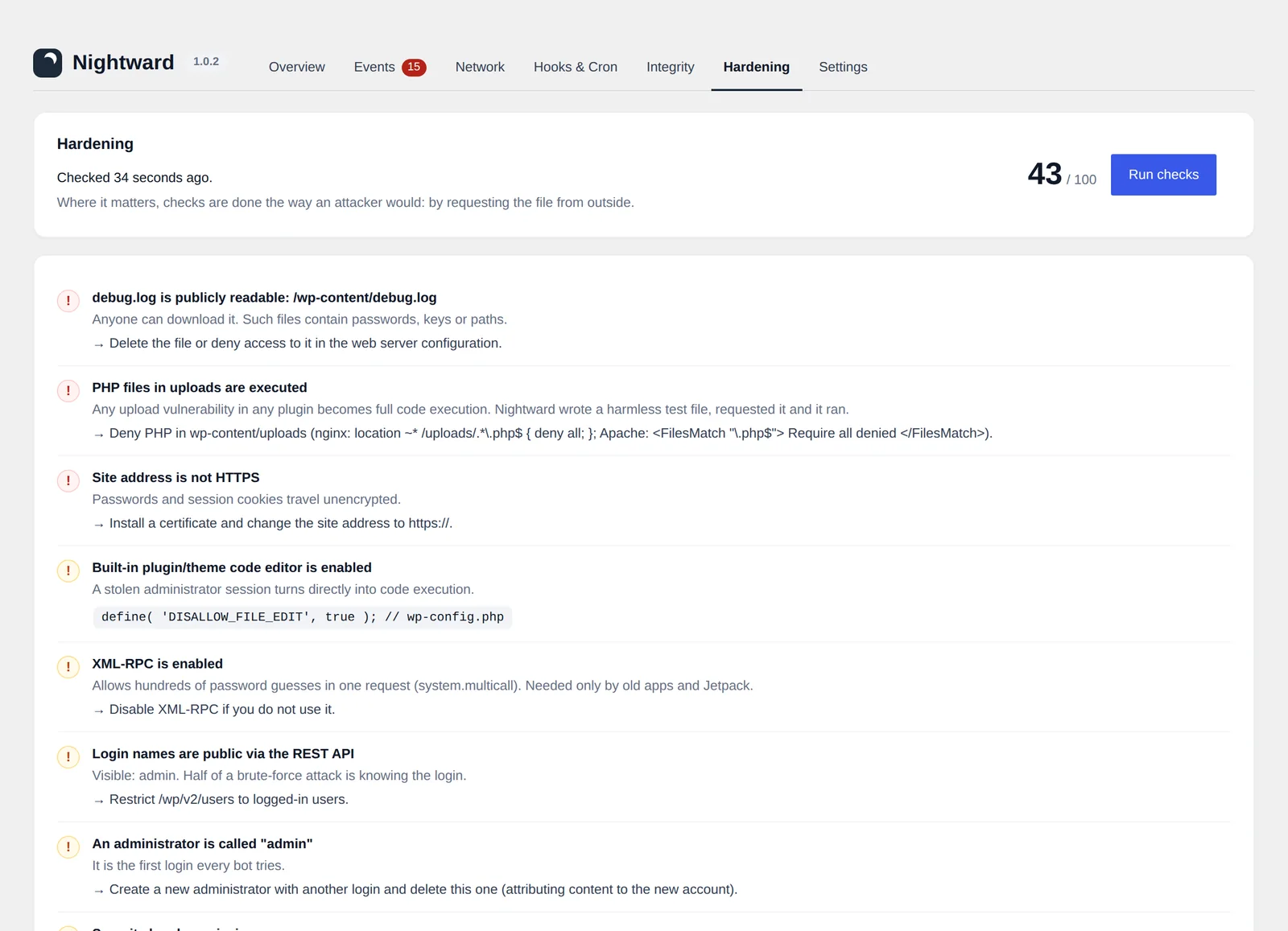
Checked from outside: public debug logs, .env and wp-config backups, PHP execution in uploads (with a real test file), XML-RPC, user enumeration, headers.

Interception

The exact callback that faked a response

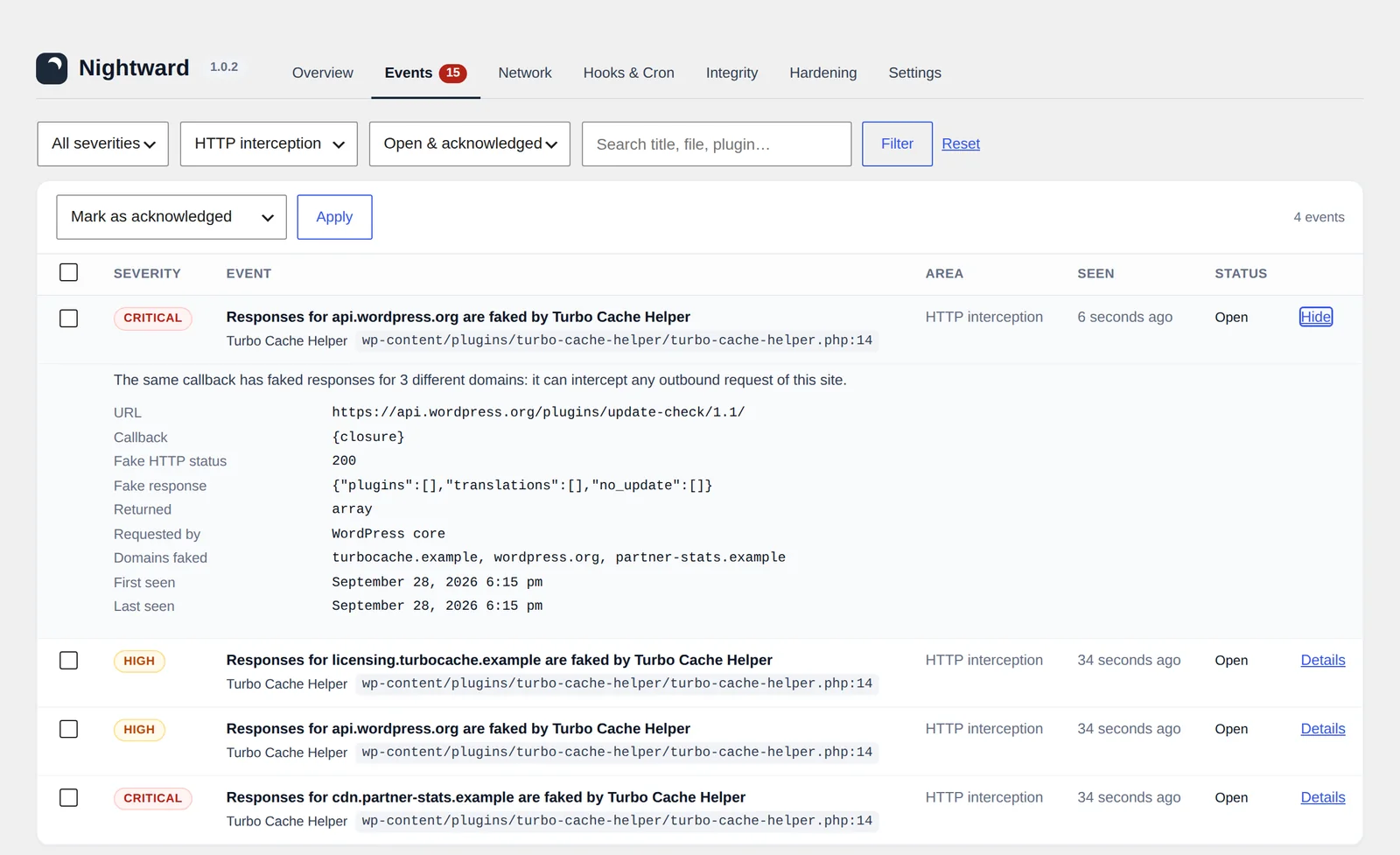
Pirated plugins answer their own licence checks so the request never leaves your server. Nightward places a marker after every callback on pre_http_request, so it knows which one replaced the response.

  • Licence and update checks answered locally are rated high.
  • Faked WordPress.org answers are rated high: your update information may be false.
  • One callback faking three or more domains is critical.
Nightward event details: responses for api.wordpress.org are faked by a plugin, with callback, file and line, fake status and body
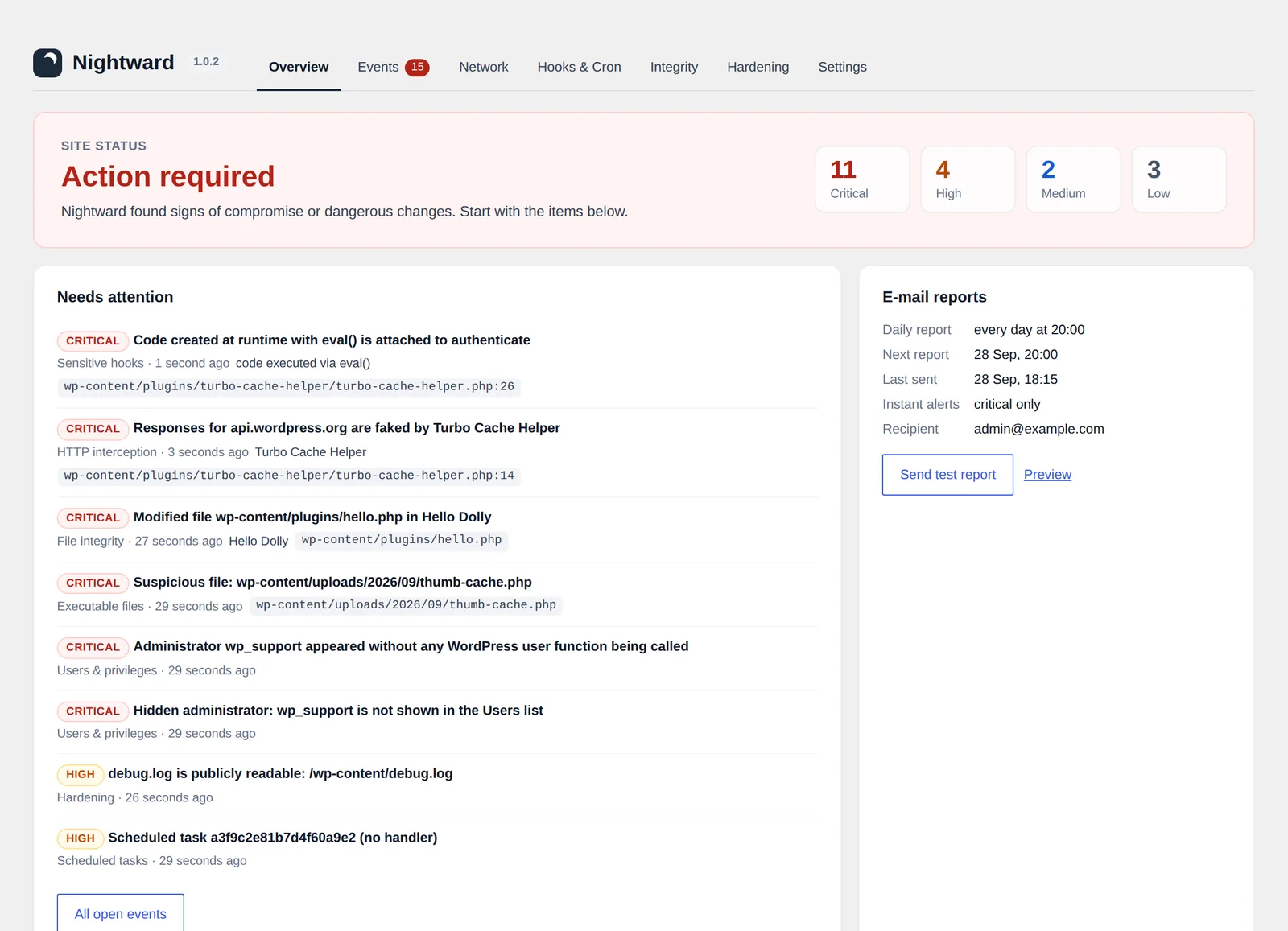
Nightward overview: action required, with critical findings listed
Users and privileges

Administrators that should not exist

An administrator created from the Users screen is routine. One created by a plugin during an anonymous request is not. Nightward records who did it and from which file.

  • Admins written straight into the database are found by the hourly audit.
  • Admins filtered out of the Users list are reported as hidden.
  • Application passwords for admins are reported, because they bypass two-factor login.
File integrity

Updates change the version. Injections do not.

Premium plugins have no public checksums, so Nightward takes a snapshot at the first scan. Later, a file that changed while the version number stayed the same is reported. Files with known malware markers such as eval(base64_decode( are raised to critical.

Scans run in small batches through WP-Cron, so they finish on shared hosting without hitting time limits.

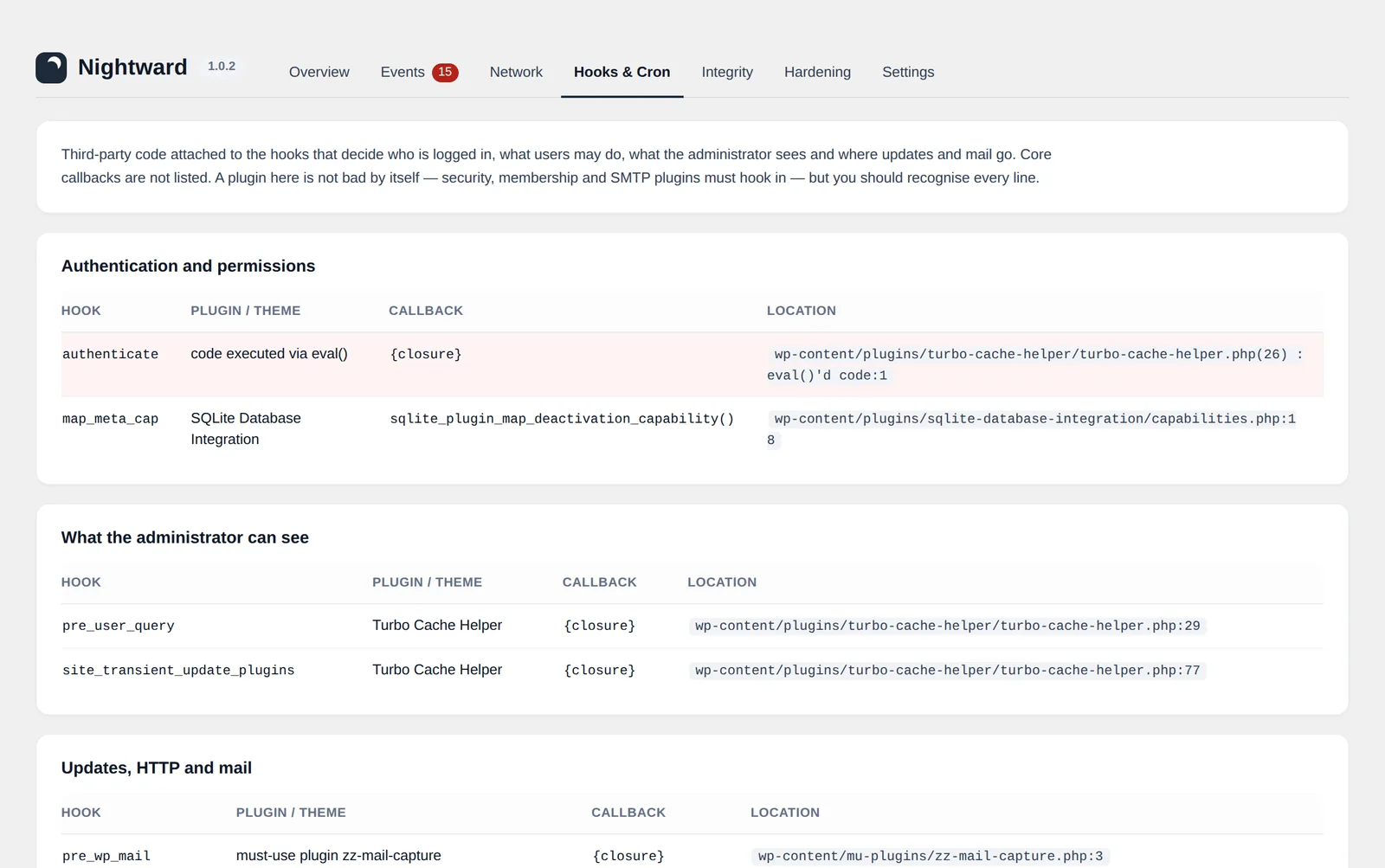
Nightward Hooks and Cron screen listing third-party callbacks on authentication and update hooks
Reports

A report at 20:00, or whenever you choose

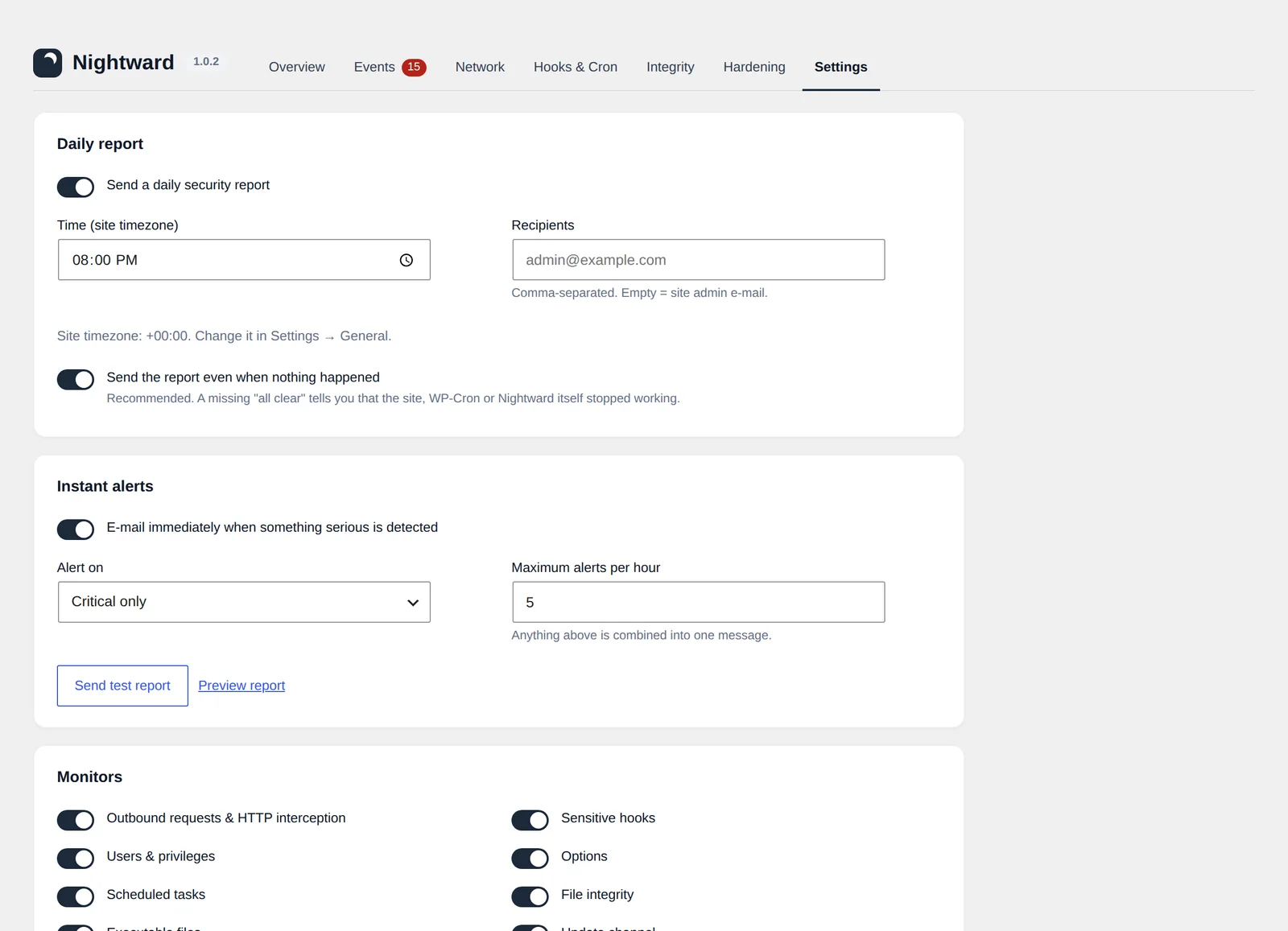
The daily report lists what happened since the last one, the most serious first. Critical findings do not wait for it: they are sent the moment they are detected.

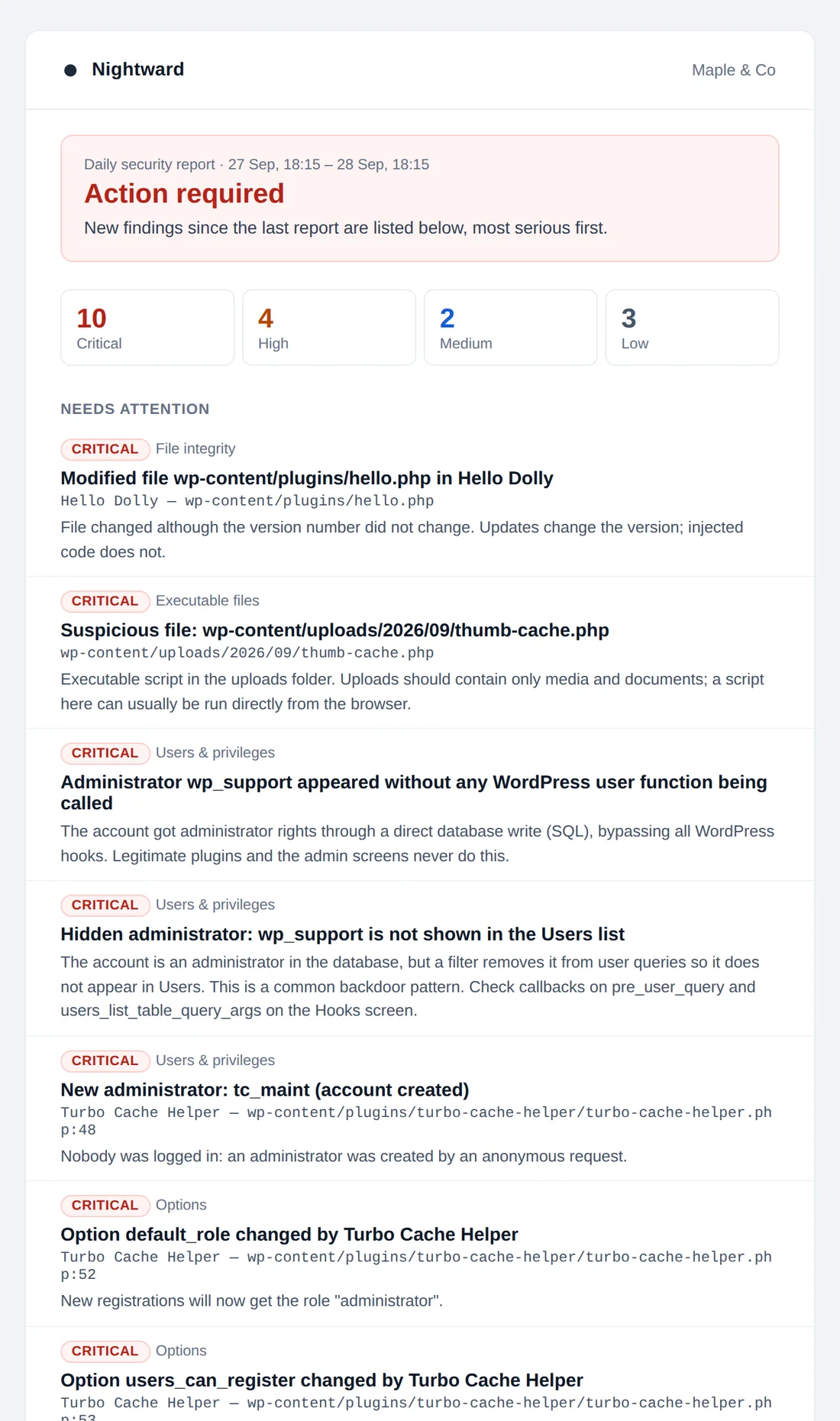
Daily report e-mail with severity counters and findings
Daily report
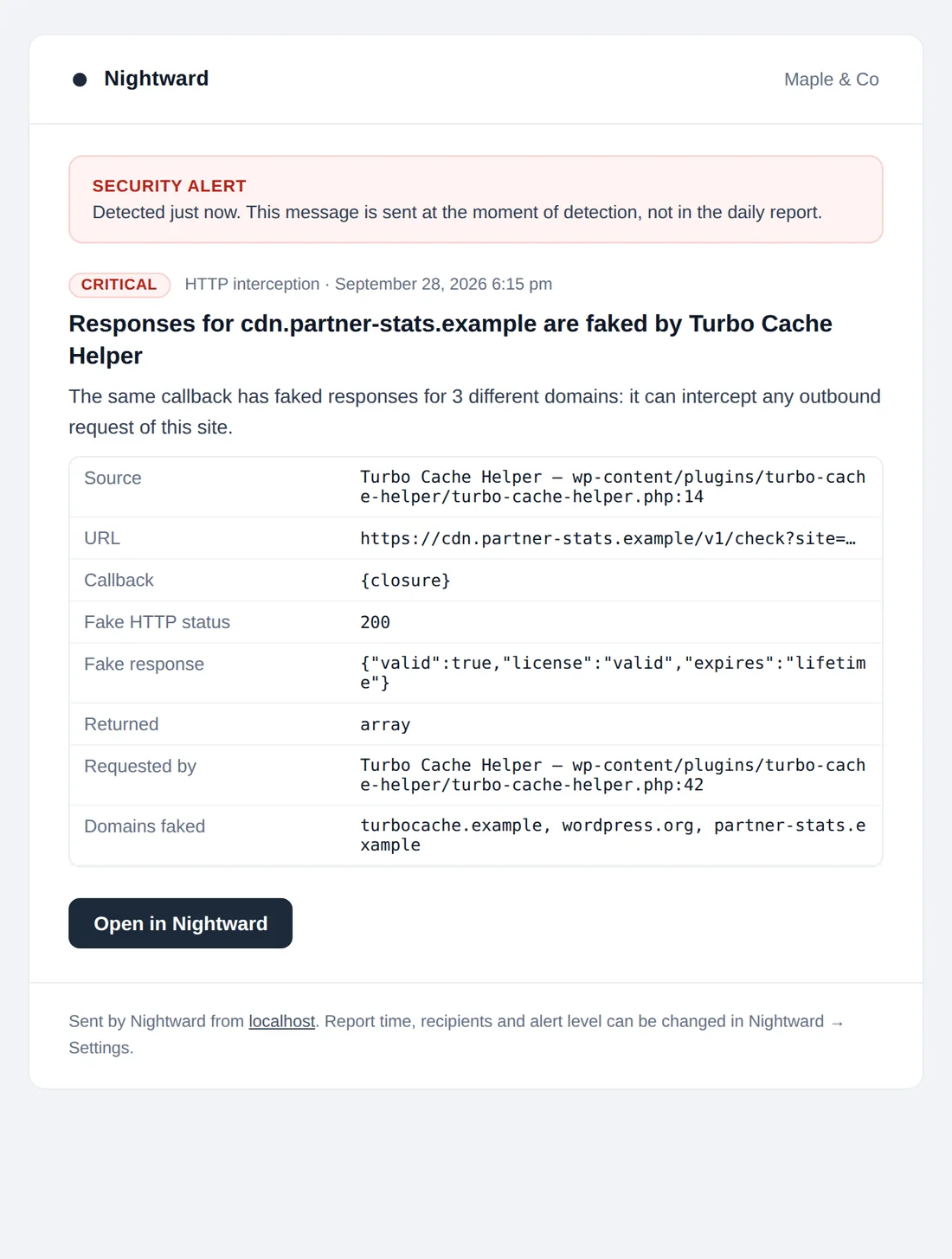
Instant alert e-mail about faked HTTP responses
Instant alert
Your hour, your timezonePick any time. The schedule follows the site timezone, including daylight saving changes.
"All clear" tooA quiet evening still gets a short report. If it stops arriving, something stopped working.
No alert floodsInstant alerts are capped per hour. The rest are combined into one message.
In the reader's languageThe report is written in the recipient's WordPress language, English or Ukrainian.
Dashboard

One screen per question

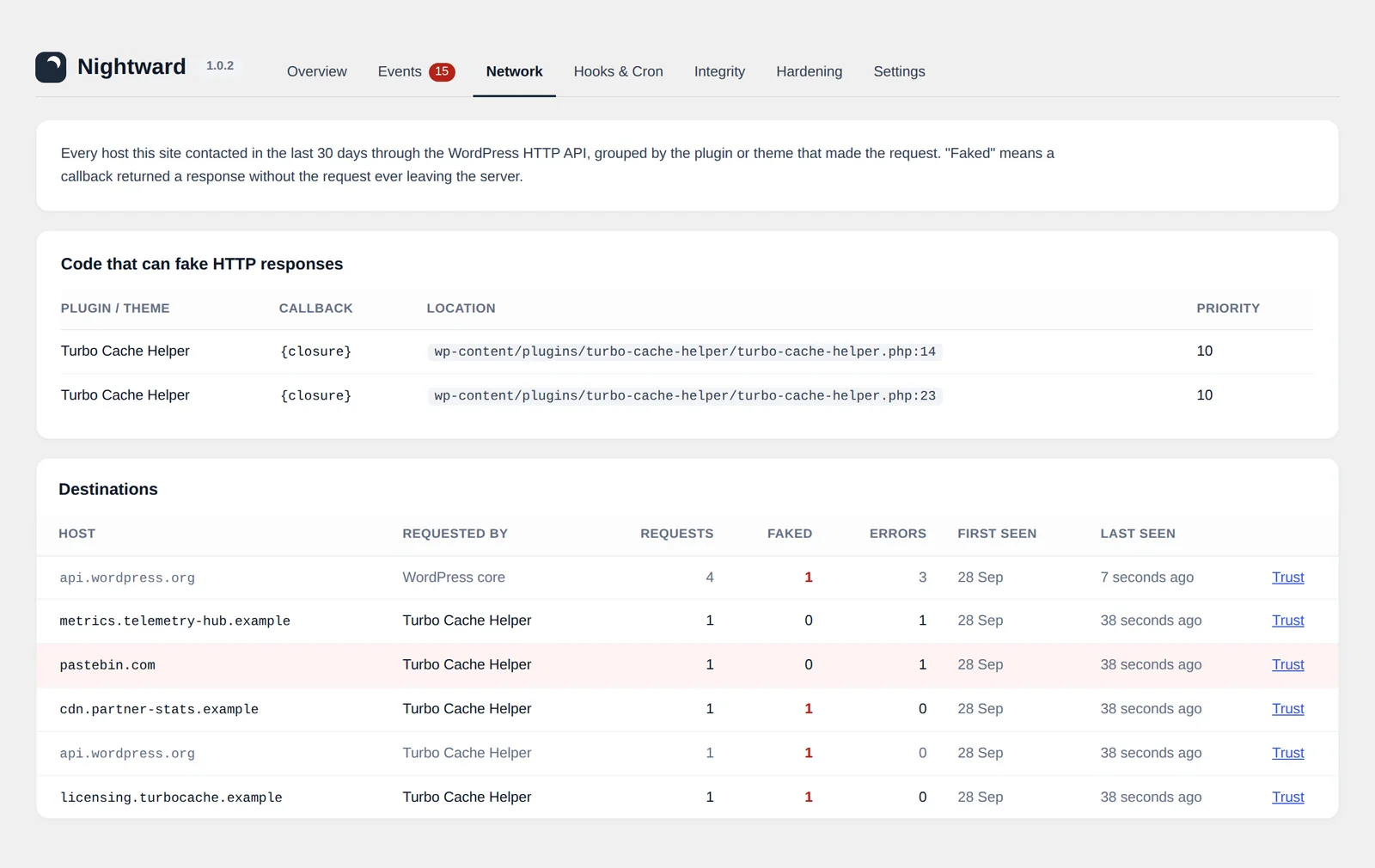
Every host the site contacted in the last 30 days, which plugin contacted it, how often, and how many responses were faked. Trust a host with one click.

Network screen with destinations and faked response counts
Limits

What Nightward cannot see

A monitor you trust should say where its view ends. These limits are also listed inside the plugin.

Raw network callsRequests made with cURL, sockets or file_get_contents() bypass the WordPress HTTP API.
Code that starts firstwp-config.php, drop-ins such as db.php, and must-use plugins loaded before Nightward's loader.
Direct database editsFound by the hourly audit, not at the moment they happen, and without the file responsible.
The first snapshotPremium plugins are trusted as they are at the first scan. Earlier modifications are not detected.
Not a firewallNightward detects and reports. Someone with server access can disable any plugin, so a missing daily report is itself an alarm.
FAQ

Questions

Can I use it together with Wordfence, Sucuri or MalCare?

Yes. Nightward does not block traffic or scan for signatures, so it does not compete with them. It covers what they do not: the behaviour of installed code, with attribution. On a test site with Sucuri, MalCare and Atlant Security installed, all four ran side by side.

Does it slow the site down?

Monitoring on each request is limited to a few in-memory checks. A stack trace is taken only when the site makes an outbound HTTP request. The hook check compares a short signature that is stored in one autoloaded option, and option writes are sampled on one page view in twenty. File scans, audits and hardening checks run in the background through WP-Cron.

Does Nightward send my data anywhere?

No. There is no account, no telemetry and no external service. The only outbound requests Nightward makes are to WordPress.org checksum endpoints and to your own site for hardening checks. Reports are sent with your site's own wp_mail().

What happens during the first day?

For the first 24 hours Nightward learns what is normal for your site: which hosts plugins contact, which hooks they use, which scheduled tasks exist. These are recorded silently. Critical findings are reported from the first minute.

I edited a plugin file myself. Will I be alerted forever?

No. Review the finding, then press "Accept current files" for that package on the Integrity screen. The current files become the new reference.

Why is it not on WordPress.org?

Nightward is distributed from this site. New versions are published here with a changelog in the documentation, and the source code is on GitHub.

Does it work on multisite?

Nightward is built and tested for single sites. It can be network-activated, but reports and settings are not yet separated per site.

Ihor Muzychenko
About the developer

Nightward is made by Ihor Muzychenko, a WordPress developer from Ukraine with more than ten years of client work on Bricks, ACF, WooCommerce and Polylang sites.

It grew out of routine audits of plugins from unofficial sources, where the question was never "is this file malware?" but "what does this code do on a live site?". More at .

Install it tonight. Read the first report tomorrow.

Upload the zip under Plugins → Add New → Upload Plugin and activate.

Version 1.0.2 · released 28 September 2026 · WordPress 6.2+ · PHP 7.4+